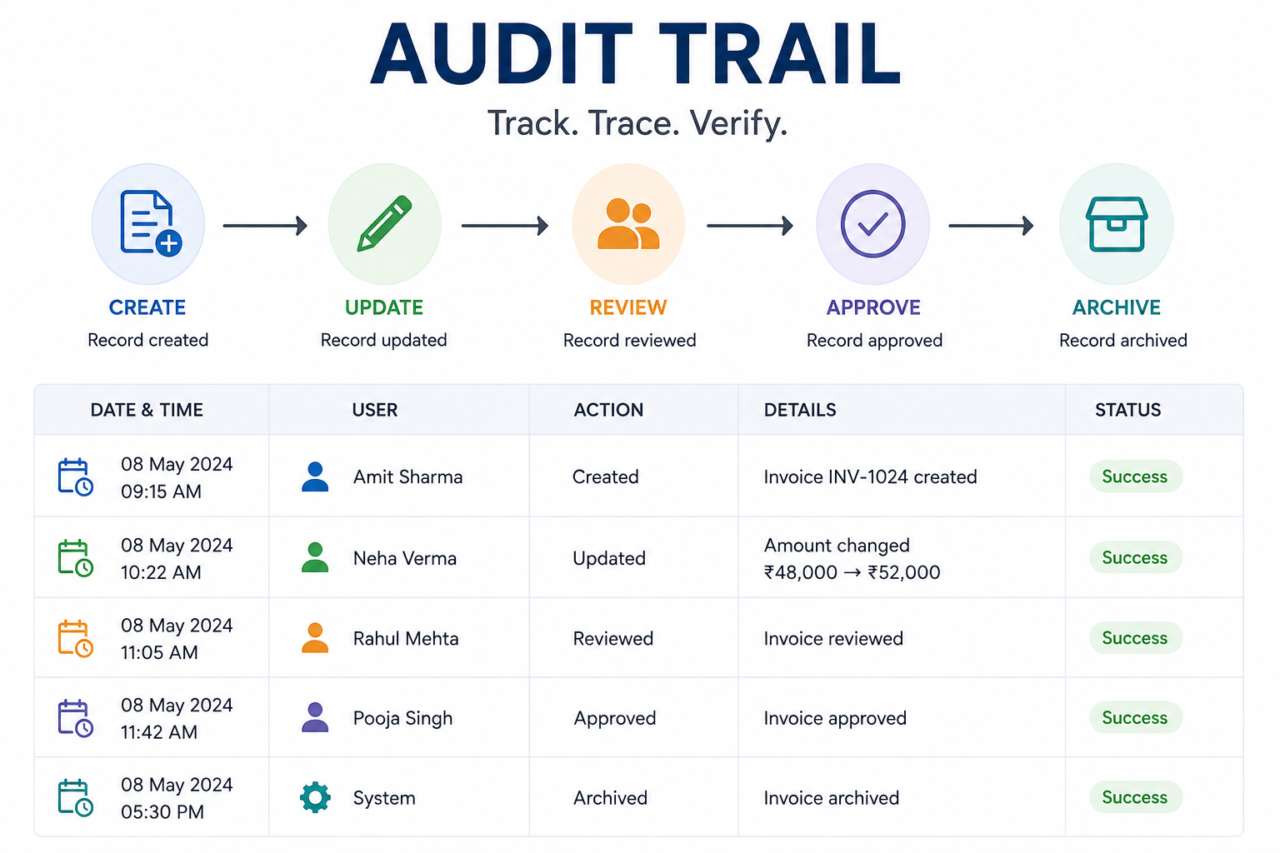
In Simple Terms:
An audit trail provides traceability and accountability for business and system activity. It tells you who did what, when, and what changed.
What Is an Audit Trail?
For internal audit and compliance teams, an audit trail provides evidence of who performed an activity, what changed, when it happened, and whether the required approval or control was followed.
It is used across accounting, internal audit, compliance, cybersecurity, financial operations, IT systems, and governance.
Audit Trail Meaning in Simple Words
Think of it as the history of an activity. For example: User created a record → manager approved it → user modified it → evidence was uploaded → reviewer validated it. Each step can become part of the audit trail.
A good audit trail should allow an auditor, investigator, or authorized reviewer to reconstruct the relevant sequence of events without relying entirely on someone’s memory or manually maintained notes.
Example:
Suppose an employee changes a purchase invoice from ₹48,000 to ₹52,000. A useful audit trail could record: Who changed it, when, why, what was the previous value, what is the new value, and who approved it.
How Does an Audit Trail Work?
What Information Should an Audit Trail Capture?
User/System Identity
Who performed the activity? For system events, the relevant service or application identity.
Date and Time
Each relevant event should have a reliable timestamp.
Action Performed
Created, Updated, Deleted, Approved, Rejected, Submitted, Reviewed, Uploaded, Login, etc.
Affected Record
Invoice ID, Audit ID, Finding ID, Vendor ID, Document ID, etc.
Previous and New Values
For critical changes: Medium → High, Open → Closed, ₹48,000 → ₹52,000
Approval/Authorization
Who approved, when, what was approved, and whether approval occurred before the next step.
Types of Audit Trails
Financial Audit Trail
Records changes to financial transactions: invoices, payments, journal entries, purchase orders, general ledger.
Internal Audit Trail
Records activities during the audit lifecycle: audit creation, risk assessment, evidence, findings, remediation, closure.
Compliance Audit Trail
Demonstrates compliance activities: requirement → control → assessment → evidence → approval → exceptions.
User Activity Audit Trail
Records user actions: login, logout, user creation, role changes, permission changes, record modifications.
Document Audit Trail
Records document history: upload, review, revision, version changes, approval, publication.
System Audit Trail
Records technical events: configuration changes, administrative activity, authentication, API activity, database changes.
Audit Trail Example
Consider a simple internal audit finding:
Audit Trail vs Audit Log
An audit log records individual system or user events, while an audit trail provides the broader record needed to reconstruct what happened, when it happened, who performed the action, and what changed.
An audit log can be one component of an audit trail, but the two terms are not always interchangeable.
Audit Trail vs Audit Evidence
An audit trail records the history of an activity, transaction, decision, or change, including details such as who performed the action, what changed, and when it occurred. Audit evidence, on the other hand, is information used by an auditor to support an audit conclusion. An audit trail can become audit evidence, but it is not automatically sufficient evidence for every audit objective.
For example, a system log showing that a user changed a configuration may establish when the change occurred and who made it. However, an auditor may also need the approved change request, authorization, testing record, or supporting documentation to determine whether the change was properly controlled.
In simple terms: an audit trail shows what happened, while audit evidence helps demonstrate whether the activity was appropriate, authorized, and compliant.
Audit Trail vs Audit Documentation
An audit trail focuses on the history of activities, transactions, and changes within a system or process. Audit documentation records the auditor’s work, including audit procedures performed, evidence examined, professional judgments, findings, and conclusions in accordance with applicable auditing requirements such as ICAI’s SA 230.
For example, a system’s audit trail may show that an audit finding was modified or closed by a particular user. The auditor’s documentation would explain how the finding was evaluated, what evidence was reviewed, what procedures were performed, and why the auditor reached the final conclusion.
In simple terms: an audit trail records the activity history, while audit documentation records the auditor’s work and reasoning.
Why Is an Audit Trail Important?
In compliance programs, an audit trail can provide traceability between a requirement, control activity, evidence, approval, exception, and remediation. This makes the audit trail an important part of a compliance audit trail.
Audit Trail and Internal Audit
An internal auditor is not only interested in the final state of a process. The auditor often needs to establish whether the control actually operated.
Consider a policy requiring quarterly privileged-access reviews. A stronger audit trail might show:
- Review initiated
- User population generated
- Access reviewed
- Exceptions identified
- Exceptions assigned
- Remediation completed
- Reviewer approved
- Evidence retained
From an internal audit perspective, an audit trail is valuable because it allows the auditor to test not only whether a control exists, but whether the control operated as intended during the period under review.
For example, if a control requires quarterly access reviews, the audit trail should help establish:
Control requirement → Review performed → Exceptions identified → Action assigned → Remediation completed → Evidence reviewed → Approval recorded
Audit Trail and Internal Controls
Consider this control: All purchase orders above ₹5 lakh require approval from the Finance Manager. A well-designed audit trail can answer:
- Who created the purchase order?
- What was its value?
- Who approved it?
- When was it approved?
- Was approval obtained before payment?
- Was the amount changed after approval?
- If it changed, who changed it?
- Was the change re-approved?
Audit Trail and Fraud Detection
An audit trail can reveal patterns such as:
Audit Trail Requirements in India
For organizations operating in India, audit trails can have specific regulatory significance depending on the system and activity involved.
For accounting software used by companies for maintaining their books of account, the Companies (Accounts) Rules, 2014 contain specific audit-trail requirements.
ICAI’s revised 2024 implementation guide specifically addresses reporting on audit trails under Rule 11(g) of the Companies (Audit and Auditors) Rules, 2014.
Important:
The actual applicability depends on the relevant legal and regulatory framework and the type of records or system involved. For compliance purposes, organizations should refer to the current applicable law, rules, notifications, and professional guidance.
Audit Trail Audit Checklist
Use this audit trail checklist to assess whether your organization’s audit records are complete, attributable, protected, retrievable, and suitable for audit or compliance review.
Common Audit Trail Problems
Logs Exist but Nobody Reviews Them
Organizations may collect millions of events without a defined monitoring process.
User Identity Is Missing
“Admin changed configuration” is much weaker than “User ID 184 changed configuration.”
Only the New Value Is Stored
Without the previous value, it’s harder to understand what changed.
Privileged Users Can Modify Logs
If the same administrator can modify both a transaction and its audit record, integrity is compromised.
Fragmented Audit Trails
Important information may exist across application logs, databases, email, and spreadsheets.
Retention Is Not Defined
The event needed for investigation may no longer exist.
Audit Trail Best Practices
Audit Trail in Audit Management Software
In modern internal audit environments, audit trails should not exist separately from the audit workflow. When audit planning, fieldwork, evidence, observations, corrective actions, approvals, and closure are managed within a centralized platform, the audit trail can provide a continuous record of the audit lifecycle. Audit trail software helps organizations capture, preserve, search, and review activity records across business processes and governance workflows.
A centralized audit trail can help teams track:
- Audit creation and approval
- Auditor assignments
- Evidence uploads and reviews
- Finding creation and updates
- Observation ownership
- Corrective action changes
- Due-date changes
- Management responses
- Evidence validation
- Approval and closure
- User and administrative activity
Audit Trail and Corrective Action Tracking
Audit trails become particularly valuable after an audit finding, observation, or control deficiency has been identified. A finding should not be considered resolved simply because management states that the “action is completed.” The organization should be able to demonstrate the complete remediation history and establish who performed, reviewed, approved, and validated each relevant action.
A well-controlled remediation trail should connect the finding with its corrective action, supporting evidence, review, and final closure.
Typical remediation flow:
Finding Identified → Owner Assigned → Corrective Action Defined → Target Date Established → Remediation Performed → Evidence Submitted → Evidence Reviewed → Remediation Validated → Finding Closed
For example, if an audit identifies inadequate access reviews, the audit trail should help establish who was assigned the remediation, what action was taken, when supporting evidence was submitted, who reviewed it, whether additional information was requested, and who approved the final closure.
This creates accountability and provides a defensible history when the finding is subsequently reviewed by internal audit, compliance, management, or an external auditor.
Audit Trail vs Change Log
A change log primarily records modifications made to an object, document, configuration, or record. An audit trail provides broader process context by recording activities and events that occur throughout a workflow.
In simple terms: a change log tells you what was changed, while an audit trail provides the wider history of what happened throughout the process.
Audit Trail vs Version History
Version history answers: What versions existed? An audit trail answers: What happened throughout the process?
For example, version history may show that a policy changed from Version 2.0 to Version 2.1. The audit trail can provide additional context, such as who submitted the change, who reviewed it, what comments were raised, who approved it, and when the updated version was published.
Therefore, version history and audit trails are complementary rather than interchangeable. Version history focuses primarily on the evolution of an object, while an audit trail focuses on the activities and events surrounding it.
How to Implement an Audit Trail
Implementing an effective audit trail requires more than simply enabling system logging. Organizations should first determine which activities need to be traceable, what information must be captured, how records will be protected, and how the resulting data will be reviewed.
Step 1
Identify Critical Processes
Step 2
Identify Events
Step 3
Define Required Fields
Step 4
Establish Protection
Step 5
Define Monitoring
Step 6
Test the Audit Trail
Audit Trail Maturity Model
Organizations can assess their audit-trail capabilities across different levels of maturity:
The objective should not necessarily be to reach the highest maturity level for every process. Organizations should prioritize audit-trail capabilities based on risk, regulatory requirements, business criticality, and the sensitivity of the underlying information.
Frequently Asked Questions
Conclusion
An audit trail provides the traceability and accountability that organizations need to support internal audits, compliance, fraud detection, and operational control. It is not just a technical logging feature—it is a governance and control capability.
The goal should not necessarily be to log everything. The goal is to create reliable traceability around the activities that matter most.
Ready to Build a Stronger Audit Trail?
Centralize audit planning, execution, evidence, findings, remediation, and audit trails with ASPIA Internal Audit Management.