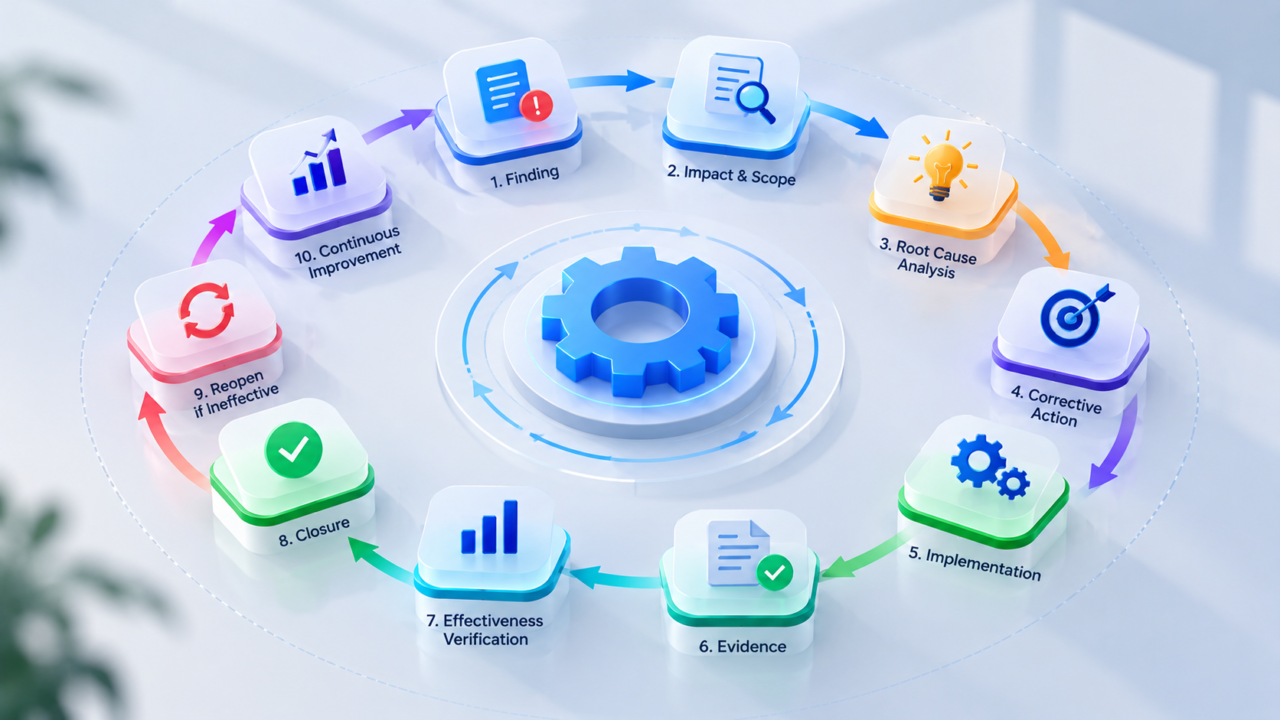
What Is Corrective Action?
Corrective action is a structured action taken to eliminate the underlying cause of an identified problem, finding, nonconformity, control failure, or other undesirable condition so that it does not recur.
A corrective action is different from simply fixing the immediate problem. For example, suppose an internal audit identifies that privileged-user access reviews were not completed within the required timeframe.
Correction
Complete the overdue access reviews.
Root Cause
The review process depends on manual reminders and has no escalation mechanism.
Corrective Action
Implement a controlled access-review workflow with defined ownership, automated reminders, escalation, evidence requirements, and approval.
Effectiveness Verification
Check subsequent review cycles to confirm that access reviews are consistently completed within the required SLA.
Key distinction:
A correction addresses what happened, while a corrective action addresses why it happened and how to prevent recurrence.
CAPA, or Corrective and Preventive Action, formalizes this lifecycle by investigating a finding, determining its cause, implementing corrective and preventive actions where appropriate, and verifying that the actions worked.
Corrective Action Meaning
In simple terms: corrective action removes the cause of an existing problem to prevent it from happening again.
The focus is not only on the visible issue. It is on the underlying process, control, system, technology, people, or governance condition that allowed the issue to occur. For example:
Problem
A critical vulnerability remained unresolved beyond the organization’s remediation SLA.
Correction
The vulnerability was patched.
Investigation
The affected asset had no clear owner, the vulnerability workflow was disconnected from asset management, remediation responsibility was unclear, and there was no automated escalation.
Corrective Action
Implement accountable asset ownership, centralized remediation workflows, SLA-based tracking, automated escalation, and management visibility.
Effectiveness Verification
Measure remediation SLA compliance across subsequent vulnerability cycles.
Why Is Corrective Action Important?
Organizations continuously generate findings from multiple sources, including:
Without a structured process, these findings often become disconnected: Audit report → Email → Spreadsheet → Follow-up → Attachment → Closure. This creates several problems: unclear ownership, overdue actions, incomplete evidence, repeated findings, weak root-cause analysis, ineffective remediation, poor management visibility, and difficulty demonstrating closure.
The objective is not simply to increase the number of findings marked Closed. The objective is to reduce recurrence and residual risk.
Correction vs Corrective Action
Example: An employee is found to have inappropriate access to a sensitive application.
Correction: Remove the inappropriate access.
Corrective action: Determine why the access was granted and improve the access-request, approval, provisioning, and review process.
Corrective Action vs Preventive Action
Corrective Action
Addresses an existing problem and seeks to prevent recurrence.
Preventive Action
Addresses a potential or related problem before it occurs.
Example:
An audit finds that one business unit does not perform quarterly vendor access reviews.
Corrective Action: Fix the vendor access-review process for that business unit.
Preventive Action: Determine whether the same process exists in other business units and extend the improved control to those areas before the same weakness generates another finding.
Corrective Action vs Remediation and Risk Treatment
Remediation
Resolving an identified issue. Example: Critical vulnerability detected → Vulnerability patched.
Corrective Action
Investigating why the issue occurred and changing the conditions that allowed it. Example: Investigate why SLA was missed → Identify ownership/process weakness → Improve remediation workflow → Implement escalation → Verify future SLA performance.
Risk Treatment
Determines how an identified risk should be addressed: mitigation, transfer, avoidance, or acceptance.
What Is Corrective Action and Preventive Action (CAPA)?
CAPA stands for Corrective and Preventive Action. CAPA is a structured closed-loop process for:
When Should a Corrective Action or CAPA Be Opened?
Not every minor issue requires a full CAPA investigation. A risk-based decision can consider: severity, business impact, security impact, regulatory impact, customer impact, recurrence, control criticality, number of affected assets, number of affected processes, potential for systemic failure, and failure trends.
CAPA Process: Complete Lifecycle
↓
↓
↓
↓
↓
↓
↓
↓
↓
↓
↓
↓
This distinction between implementation and effectiveness is critical. An action can be completed and still fail to solve the original problem.
Corrective Action Process: 10 Steps
1. Identify and Document the Problem
Start with a precise problem statement. Avoid: “Access management is weak.” Instead: “During the quarterly access review conducted in September 2026, 18 of 240 privileged accounts did not have evidence of completed review within the required period.”
A good problem statement should describe: what happened, when, where, how it was detected, what requirement was not met, and what evidence supports the finding.
2. Apply Immediate Correction or Containment
Where necessary, reduce immediate exposure before completing the investigation. Examples: disable an inappropriate account, patch an exposed vulnerability, restrict a misconfigured firewall rule, suspend a high-risk vendor account, correct inaccurate compliance records, restore a missing security control. This is containment or correction. It does not replace corrective action.
3. Assess Impact and Risk
Determine how significant the issue is. Consider: business impact, financial impact, security impact, regulatory exposure, customer impact, data sensitivity, number of affected systems/users/vendors, control criticality, likelihood of recurrence. Risk assessment should influence the depth and urgency of the investigation.
4. Perform an Extent-of-Condition Assessment
This is one of the most important parts of a mature CAPA process. Ask: Where else could the same condition exist?
Example:
Original finding: One application lacked evidence of quarterly access review.
Extent assessment: 42 applications use the same access-review process.
Result: 7 additional applications have the same weakness.
5. Perform Root Cause Analysis
Root Cause Analysis (RCA) determines why the problem occurred. Common techniques include:
- 5 Whys: Useful when there is a relatively linear chain of causation.
- Fishbone / Ishikawa: Useful when possible causes span categories such as people, process, technology, policy, environment, measurement, and management.
- Fault Tree Analysis: Useful where multiple conditions or control failures combine to produce an outcome.
A root cause is not a conclusion merely because it sounds plausible. It should be supported by evidence.
Symptom vs Immediate Cause vs Root Cause
Symptom: Vulnerabilities are overdue.
Immediate Cause: The vulnerability was not remediated within the required period.
Contributing Cause: The application team did not receive timely escalation.
Root Cause: The vulnerability-management process has no integrated ownership and escalation mechanism.
Escape / Detection Cause: The organization did not have monitoring capable of identifying recurring SLA breaches early enough.
6. Define Corrective and Preventive Actions
Actions should flow directly from the verified root cause.
Poor Corrective Action
“Send reminder emails to application teams.”
Stronger Corrective Action
“Implement centralized vulnerability remediation workflows with asset ownership, SLA assignment, escalation, and management monitoring.”
7. Assign Owners, Deadlines and Approval
Every action should have: action description, owner, due date, priority, dependencies, required evidence, approval requirement, and status.
Example:
Action: Implement automated escalation for critical vulnerability SLA breaches
Owner: Vulnerability Management Lead
Due Date: 30 November 2026
Evidence: Workflow configuration and escalation logs
Effectiveness: ≥95% SLA compliance for the next three reporting cycles
8. Implement the Corrective Action
The assigned owner implements the approved action. Depending on the issue, implementation may include: process changes, policy changes, technology changes, workflow automation, configuration changes, control redesign, training, system integration, vendor changes, access-control changes, monitoring improvements. Implementation should be tracked against the approved plan.
9. Collect Evidence and Verify Implementation
The organization should verify that the action was actually implemented. Examples of implementation evidence: updated procedure, configuration screenshots, system records, change tickets, workflow configuration, access-review reports, training records, vendor confirmation, system logs, control test results.
But implementation evidence answers only: Did we implement the action? It does not answer: Did the action work? That requires effectiveness verification.
10. Verify Effectiveness and Approve Closure
This is the most important control point in the corrective action process.
Implementation Verification
Was the planned action completed?
Effectiveness Verification
Did the action actually solve the underlying problem?
How to Verify Effectiveness of Corrective Action
A useful effectiveness test should define five things:
1. What will be measured?
Example: Percentage of critical vulnerabilities remediated within SLA.
2. What is the target?
Example: ≥95%.
3. What period will be observed?
Example: Three consecutive reporting cycles.
4. What evidence will be used?
Example: Vulnerability-management records and SLA dashboard.
5. Who verifies the result?
Preferably someone independent of the person who implemented the action where practical.
Effectiveness Verification Example
Original finding: 20% of quarterly access reviews were completed late.
Corrective action: Automated review workflow and escalation implemented.
Effectiveness criteria: At least 95% of quarterly access reviews must be completed within the defined SLA for three consecutive review cycles.
Conclusion: The defined effectiveness criteria were met.
What Happens When Corrective Action Fails?
A failed effectiveness check should not simply become a comment in a closed record. It should trigger a controlled loop:
If the same problem recurs, the organization should ask whether: the root cause was wrong, the action was too narrow, the extent-of-condition was incomplete, the control was poorly designed, the effectiveness criteria were inadequate, or another contributing cause was missed.
Corrective Action Plan Template
Corrective Action Examples
Example 1: Internal Audit Finding
Finding: An internal audit identifies incomplete evidence for quarterly user-access reviews.
Correction: Complete missing reviews and collect evidence.
Root Cause: The organization uses manual reminders with no centralized escalation.
Extent-of-Condition: The same workflow is used across multiple applications and business units.
Corrective Action: Implement a centralized access-review workflow with accountable ownership, automated reminders, escalation, evidence submission, approval, and overdue monitoring.
Preventive Action: Extend the workflow to all applications using the same access-review process.
Effectiveness Verification: Verify SLA compliance across the next three review cycles.
Example 2: Cybersecurity Vulnerability Management
Finding: Critical vulnerabilities repeatedly exceed the remediation SLA.
Correction: Remediate the currently overdue vulnerabilities.
Root Cause: Incomplete asset ownership, disconnected vulnerability and remediation workflows, unclear responsibility, inadequate escalation.
Extent-of-Condition: The same process is used across several business units.
Corrective Action: Implement centralized remediation workflows with asset ownership, risk-based prioritization, SLA assignment, escalation, remediation evidence, and exception handling.
Preventive Action: Extend ownership validation and SLA monitoring across all critical assets.
Effectiveness Verification: Measure SLA compliance across subsequent vulnerability cycles.
Example 3: Third-Party Risk Management
Finding: A critical vendor’s annual security assessment was not completed within the required timeframe.
Root Cause: Assessment dates are maintained manually and there is no automated escalation.
Corrective Action: Implement centralized vendor inventory, risk-based assessment schedules, automated reminders, escalation, evidence collection, and approval workflow.
Preventive Action: Apply the same process to all critical and high-risk vendors.
Effectiveness Verification: Measure assessment completion against the required timeline during the next assessment cycle.
Example 4: Compliance Control Failure
Finding: A compliance control was marked compliant without sufficient supporting evidence.
Root Cause: The process did not define minimum evidence requirements and lacked independent validation.
Corrective Action: Implement evidence requirements, control-owner submission, evidence validation, reviewer approval, expiry monitoring, and audit trail.
Effectiveness Verification: Sample subsequent control assessments and verify that compliant statuses are supported by validated evidence.
Corrective Action Tracking and Management
A small team may track corrective actions in a spreadsheet. An enterprise environment usually requires more. A centralized corrective action management process should track: finding source, finding ID, risk, severity, business unit, root cause, extent-of-condition, corrective action, preventive action, owner, due date, SLA, evidence, reviewer, effectiveness criteria, verification result, closure approval, and reopening history.
Useful Statuses
Additional statuses can include: Overdue, Rejected, Reopened, Escalated, and Risk Accepted.
Corrective Action KPIs and Metrics
Open Corrective Actions
Total number of active actions.
Overdue Corrective Actions
Number and percentage beyond due dates.
Average Closure Time
Average time from opening to approved closure.
Average Time to Remediation
Time from identification to implementation.
Effectiveness Failure Rate
Percentage of actions that fail effectiveness verification.
Repeat Finding Rate
Percentage of findings that recur after closure.
Corrective Action Aging
0–30 days, 31–60 days, 61–90 days, 90+ days.
SLA Compliance
Percentage of actions completed within defined timelines.
The most important metrics are not necessarily the ones showing the highest closure rate. A 98% closure rate means little if the organization continues to generate the same findings.
Corrective Action in Internal Audit
Internal audit generates findings that frequently require structured remediation. A mature audit observation management process should connect:
Organizations looking for a broader audit workflow can connect corrective action management with internal audit management.
Corrective Action in Cybersecurity
Cybersecurity teams continuously generate findings through VAPT, vulnerability assessments, application security, security incidents, configuration reviews, security audits, threat monitoring, compliance assessments, and penetration testing.
A mature cybersecurity corrective action process should ask more than “Was the vulnerability fixed?” It should also ask: Why did the vulnerability exist? Why was it not detected earlier? Why did remediation take too long? Was ownership defined? Was the SLA appropriate? Did the same vulnerability exist elsewhere? Did the control work? Has the issue recurred?
Corrective Action in Compliance Management
Compliance teams may manage hundreds or thousands of controls across different frameworks. A structured process can connect:
Corrective Action in Third-Party Risk Management
Third-party corrective actions frequently involve multiple stakeholders: vendor, procurement, business owner, information security, risk, compliance, and internal audit. A centralized workflow can provide vendor-specific findings, risk rating, root cause, remediation plan, vendor owner, target date, evidence, validation, escalation, and closure.
Corrective Action Audit Trail
A complete corrective action should have a traceable history. The audit trail should capture: who created the finding, when it was created, who changed the status, what changed, previous value, new value, who submitted evidence, who approved the action, who verified effectiveness, when it was closed, whether it was reopened, and why.
Learn more in our Audit Trail Guide.
Evidence in Corrective Action Management
Evidence should be treated as part of the corrective action lifecycle—not as an attachment added at the end. A mature process can distinguish:
Finding Evidence
Evidence proving the original issue existed.
RCA Evidence
Evidence supporting the root-cause conclusion.
Implementation Evidence
Evidence proving that the corrective action was implemented.
Effectiveness Evidence
Evidence proving that the action worked.
When Should a Corrective Action Be Reopened?
Common Corrective Action Mistakes
1. Treating Correction as Corrective Action
The immediate issue is fixed, but the underlying cause remains.
2. Using “Human Error” as the Root Cause
Describes the event but often does not explain the system condition that enabled it.
3. Making Training the Default Solution
May be appropriate, but should not replace fixing a process or system-design weakness.
4. Skipping Extent-of-Condition
Fixes one finding without checking whether the same problem exists elsewhere.
5. Unsupported Root Cause
The root cause is written as a conclusion without supporting evidence.
6. No Named Owner
“IT team” is not sufficient accountability.
7. No Due Date
An action without a target date cannot be effectively governed.
8. No Defined Evidence
Does not establish what must be provided to demonstrate implementation.
9. Closing Immediately After Implementation
Marks complete without allowing time to verify effectiveness.
10. Measuring Closure Instead of Recurrence
Celebrates fewer open findings while the same findings continue to appear.
11. No Independent Verification
The person implementing the fix also decides that the fix worked.
12. No Reopening Mechanism
The system treats closure as permanent even when effectiveness later fails.
How to Automate Corrective Action Management
Corrective action becomes significantly more effective when it is connected to the systems that generate findings. Instead of Audit Report → Email → Spreadsheet → Follow-up, an automated workflow can become:
Automation can support: automatic action creation, owner assignment, SLA calculation, notifications, escalation, evidence collection, approval workflows, risk-based prioritization, aging analysis, dashboards, effectiveness verification, recurrence analysis, audit trails, and management reporting.
Corrective Action Management with ASPIA
ASPIA approaches corrective action as part of the broader enterprise governance and security workflow rather than as an isolated task list.
Corrective actions can originate from multiple operational domains, including: Internal Audit, Risk Management, Third-Party Risk Management, Vulnerability Remediation, Application Security, Incident Management, Compliance, Control Testing, Exception Management, and Policy Management.
↓
↓
↓
↓
↓
↓
↓
↓
↓
↓
Learn more about ASPIA Risk Management Software, ASPIA Exception Management.
Corrective Action Maturity Model
Corrective Action Checklist
Before approving a corrective action for closure, verify the following.
Problem
- ☐ Is the problem clearly defined?
- ☐ Is the finding supported by evidence?
- ☐ Is the affected scope documented?
Risk
- ☐ Has impact been assessed?
- ☐ Has the action been appropriately prioritized?
Extent of Condition
- ☐ Was the same condition checked elsewhere?
- ☐ Is the scope supported by evidence?
- ☐ Were similar systems, processes, vendors, or business units considered?
Root Cause
- ☐ Was a structured RCA performed?
- ☐ Is the root cause supported by evidence?
- ☐ Were contributing causes considered?
- ☐ Was the escape/detection mechanism considered where relevant?
Corrective Action
- ☐ Does the action directly address the root cause?
- ☐ Is preventive action required?
- ☐ Is an owner assigned?
- ☐ Is a due date defined?
Evidence
- ☐ Is implementation evidence available?
- ☐ Is the evidence traceable?
- ☐ Has the evidence been reviewed?
Effectiveness
- ☐ Are measurable effectiveness criteria defined?
- ☐ Is an appropriate observation period defined?
- ☐ Has effectiveness actually been tested?
- ☐ Does the evidence demonstrate that the problem has been addressed?
Closure
- ☐ Are all required actions complete?
- ☐ Has an authorized reviewer approved closure?
- ☐ Is the complete audit trail available?
- ☐ Can the action be reopened if effectiveness fails?
Corrective Action FAQs
Conclusion
Corrective action is not simply about fixing what went wrong.
It is about establishing a complete chain of accountability:
↓
What is the actual scope?
↓
Why did it happen?
↓
Where else could the same problem exist?
↓
What corrective action addresses the root cause?
↓
What preventive action is required elsewhere?
↓
Who owns the action?
↓
What evidence proves implementation?
↓
Did the action actually work?
↓
Who verified it?
↓
Should the action be closed or reopened?
That is the difference between closing a finding and effectively resolving a finding.
A mature corrective action and preventive action process creates a closed loop between findings, risk, root cause, remediation, evidence, effectiveness verification, accountability, and continuous improvement.
Operationalize Corrective Action Management with ASPIA
For organizations managing internal audits, compliance gaps, cybersecurity findings, vulnerabilities, third-party risks, control failures, and operational issues across multiple teams, centralized corrective action management provides the visibility and traceability needed to move from finding management to measurable risk reduction.